
The Quick Answer: IPTV Speed Requirements at a Glance
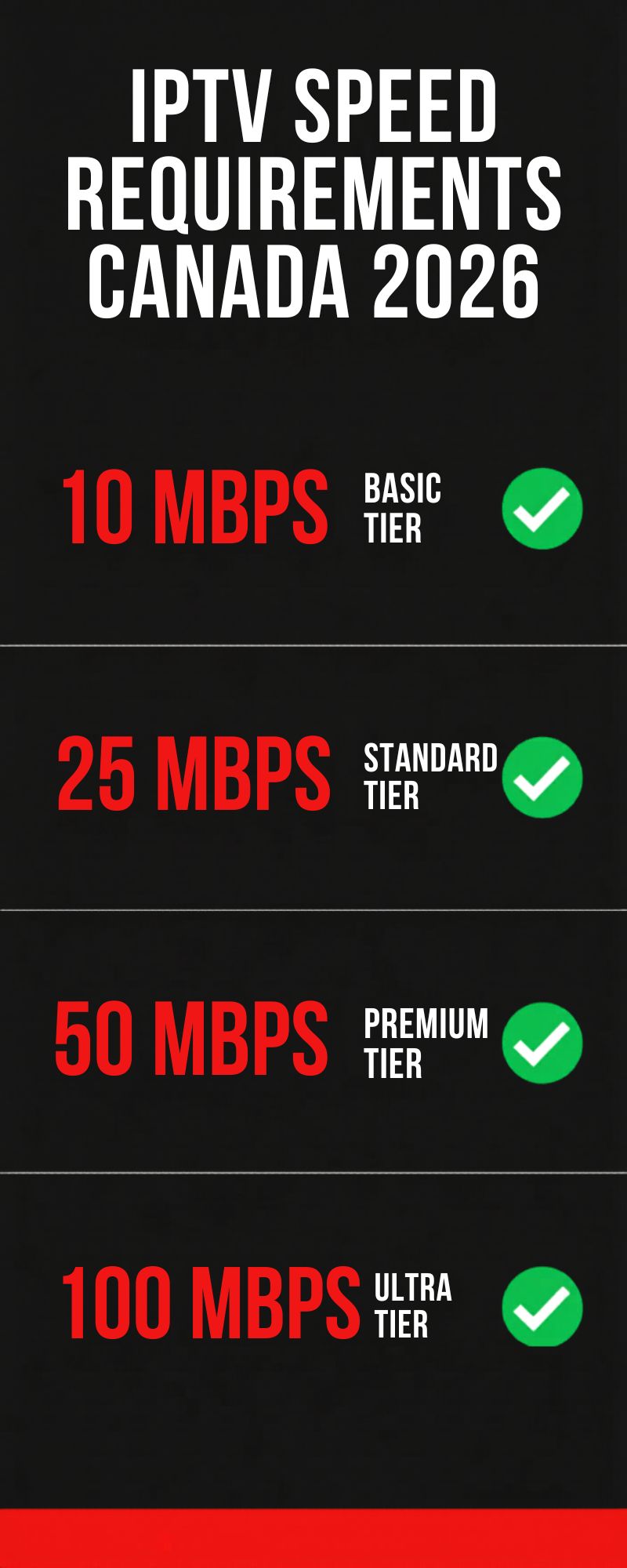
Before diving into the details, here’s the straightforward speed breakdown every Canadian IPTV subscriber needs to know. According to CRTC broadband targets, most Canadian homes already exceed the minimum requirements for HD IPTV streaming:
Most Canadian home internet plans from Bell, Rogers, Telus, and Shaw already provide 100+ Mbps. If you’re on a standard residential plan, your connection is almost certainly fast enough for 4K IPTV on multiple devices right now. Try MAXIPTV free to confirm.
How to Check Your Current Internet Speed in Canada
Before subscribing to any IPTV service, run a speed test to know exactly what you’re working with. Use one of these free tools:
- Fast.com: Run a quick download speed test at fast.com — powered by Netflix infrastructure, accurate for streaming benchmarks. Takes under 10 seconds.
- Speedtest.net: For a more detailed report including upload speed, ping, and jitter, use Speedtest.net by Ookla. Ping under 50ms is ideal for live IPTV streams.
- CRTC Broadband Check: The CRTC’s internet performance page shows average speeds by Canadian region — useful to compare your speed against provincial averages.
- Try OpenSpeedTest too: OpenSpeedTest.com runs directly in your browser with no app needed — useful for Smart TVs and devices where installing an app is inconvenient.
- Test at peak hours: Always run your speed test between 7–10pm on a weeknight — not at 2pm. Peak-hour speeds are what actually matter for live IPTV, and they can drop 20–40% below your advertised plan speed.
- Test on WiFi and wired separately: Your router may be the bottleneck, not your ISP. If wired is fast but WiFi is slow, upgrading your router solves the problem — not your internet plan.
Internet Speed vs IPTV Quality: Full Breakdown
Here’s exactly how your internet speed translates to IPTV picture quality — and what you’ll experience at each tier on MAXIPTV:
| Internet Speed | Stream Quality | Live Sports | 4K Available | Devices |
|---|---|---|---|---|
| Under 10 Mbps | SD / 480p only | Frequent buffering | ✗ No | 1 |
| 10–15 Mbps | 720p HD | Occasional drops | ✗ No | 1–2 |
| 25 Mbps | 1080p Full HD | Smooth ✓ | ⚠ Limited | 2 |
| 50 Mbps | 4K Ultra HD ✓ | Zero buffering ✓ | ✓ Full 4K | 2–3 |
| 100 Mbps+ | 4K on all screens | Perfect ✓ | ✓ Full 4K | 4+ |
| 🍁 Based on MAXIPTV testing · March 2025 · maxiptv.ca | ||||
WiFi vs Wired: Which Is Better for IPTV in Canada?
Your internet plan speed is only half the story. How your device connects to your router matters just as much — especially for 4K live sports streams.
- Wired Ethernet is always better for IPTV: A direct cable connection eliminates wireless interference, reduces latency, and delivers your full plan speed to your streaming device. If your TV or Firestick supports Ethernet, use it — especially for 4K live sports.
- WiFi 5 (802.11ac) is sufficient for 1080p: Most modern routers deliver 100+ Mbps over WiFi 5, which is more than enough for HD IPTV on one or two devices. Wi-Fi Alliance recommends WiFi 6 for households with 4+ simultaneous streams.
- WiFi 6 (802.11ax) for multi-room 4K: If you’re streaming 4K on 3 or more devices simultaneously, a WiFi 6 router dramatically reduces congestion and interference — no Ethernet runs needed.
- Router placement matters: A router in a closet or corner can reduce WiFi speeds by 50% or more. Place it in a central, elevated location for the best IPTV performance throughout your home.
- 2.4 GHz vs 5 GHz bands: Always connect your IPTV device to the 5 GHz band — it’s faster and less congested than 2.4 GHz, which is shared with microwaves, baby monitors, and neighbours’ networks.
Some Canadian ISPs — including Bell and Rogers — have been known to throttle streaming traffic during peak hours. If your speed test shows 100 Mbps but your IPTV buffers at 8pm, your ISP may be throttling video streams. Use Speedtest.net and compare peak vs off-peak speeds. If there’s a large gap, contact your ISP or consider a provider that doesn’t throttle — like TekSavvy or VMedia.
How Much Speed Do Canadian ISP Plans Actually Provide?
According to CRTC internet performance data, here’s what major Canadian ISPs typically deliver during peak hours:
| Canadian ISP | Entry Plan | Mid Plan | 4K IPTV Ready? |
|---|---|---|---|
| Bell Fibe | 50 Mbps | 500 Mbps | ✓ Yes |
| Rogers Ignite | 75 Mbps | 500 Mbps | ✓ Yes |
| Telus PureFibre | 25 Mbps | 300 Mbps | ✓ Yes |
| Shaw / Freedom | 30 Mbps | 150 Mbps | ✓ Yes |
| TekSavvy | 30 Mbps | 300 Mbps | ✓ Yes |
| Rural / Satellite | 5–25 Mbps | 50 Mbps | ⚠ HD Only |
| Source: CRTC broadband data · speeds vary by location and time of day | |||
If you’re on any standard home internet plan from Bell, Rogers, Telus, or Shaw — you already have more than enough speed for 4K IPTV. The issue is never your plan speed. It’s peak-hour throttling, WiFi interference, or a low-quality IPTV provider with overloaded servers. MAXIPTV’s anti-buffering CDN is engineered specifically for Canadian ISP networks. See why MAXIPTV is Canada’s best solution.
Frequently Asked Questions
What internet speed do I need for IPTV in Canada?
Can I watch IPTV in Canada with 10 Mbps internet?
Why is my IPTV buffering even with fast internet?
Is 25 Mbps enough for 4K IPTV in Canada?
Does WiFi work for IPTV or do I need a wired connection?
How do I test my internet speed for IPTV in Canada?
Related Guides
Test MAXIPTV on Your Connection — Free
No credit card. Full access. Cancel anytime.
15,000+ channels · True 4K · NHL · TSN · UFC · From $12.99/mo
Instant activation · Works on all devices · Cancel anytime · No contracts
